
Server Components, Server Actions, and Route Handlers: The Mental Model That Finally Made Next.js Click
I have spent most of my career building backend services, APIs, and web applications using technologies such as C#/.NET, React, Node.js, AWS, and Azure.
Because of that background, I have a fairly ingrained mental model for how a web application works.
Something in the browser needs data or needs to perform an operation, so it calls an API.
React / Browser
      ↓
   REST API
      ↓
Service Layer
      ↓
   Database
There is nothing wrong with this architecture. I have built plenty of systems this way, and I will continue building systems this way where it makes sense.
But when I started learning the Next.js App Router, I realised I was carrying this model into Next.js a little too literally.
If I needed to load some data, my instinct was to think about the API.
If a button needed to update something, my instinct was to think about the endpoint.
Then I built DocumentHub, a small document management application using Next.js and Supabase.
It has authentication, document uploads, PostgreSQL metadata, Row Level Security, document lifecycle management, and private storage.
While building it with Next.js 16.3.8, Server Components, Server Actions, and Route Handlers gradually started to make sense. The examples here reflect that version of the project.
The thing that made them click wasn't memorising what each feature did.
It was changing how I think about the boundary between my React application and my server.
The assumption I brought into Next.js
Imagine I have a document and the user clicks Archive.
My traditional architecture instinct might produce something like this:
Browser
   ↓
POST /api/documents/123/archive
   ↓
Controller
   ↓
Service
   ↓
Database
Again, perfectly reasonable. But if the only caller is my own React UI, I should ask whether I need to design and maintain a separate HTTP contract for that operation. Next.js made me reconsider that assumption.
Server Components changed how I think about reads
With the Next.js App Router, components are Server Components by default unless I explicitly introduce a Client Component boundary.
That initially sounded more complicated than it turned out to be.
The simpler mental model I now use is:
A Server Component is React code that runs on the server.
Because it runs on the server, it can perform server-side work while rendering the UI.
For example, a simplified version of a DocumentHub document page could look like this:
import { createClient } from '@/lib/supabase/server';
import { notFound, redirect } from 'next/navigation';

const DocumentDetailsPage = async ({
  params,
}: {
  params: Promise<{ id: string }>;
}) => {
  const { id } = await params;

  const supabase = await createClient();

  const {
    data: { user },
  } = await supabase.auth.getUser();

  if (!user) {
    redirect('/auth/login');
  }

  const { data: document, error } = await supabase
    .from('documents')
    .select('*')
    .eq('id', id)
    .single();

  if (error || !document) {
    notFound();
  }

  return (
    <main>
      <h1>{document.name}</h1>
      <p>{document.status}</p>
    </main>
  );
};

export default DocumentDetailsPage;
The page can load the data on the server and render it without a separate GET /api/documents/123 request. That does not mean every query or business rule belongs in page.tsx; it means an API is not a mandatory middle layer just to connect server-rendered UI to server-side logic.
The form that confused me
I initially thought a page with a button to archive or restore a document needed to be a Client Component. But a Server Component can render a form that invokes a Server Action:
<form
  action={async () => {
    'use server';
    await restoreDocument(document.id);
  }}
>
  <button type="submit">Restore</button>
</form>
These are separate questions: where does the component execute, where does the mutation execute, and does the interface need browser-side React? A form does not by itself require a Client Component. Keeping those boundaries distinct helped me stop treating “interactive” and “client-side React” as synonyms.
Server Actions made sense when I stopped designing an API for every action
DocumentHub has several UI-initiated mutations:
- archive a document
- restore a document
- permanently delete a document
- upload a document
Sign-out is a separate case in this project: it is implemented as a Route Handler.
My old instinct might have been to expose endpoints for them:
POST   /api/documents/:id/archive
POST   /api/documents/:id/restore
DELETE /api/documents/:id
POST   /api/documents
Instead, many of these operations fit naturally as Server Actions.
There is an important caveat in the upload example. DocumentHub's upload action checks for files up to 5 MB, but the project does not configure serverActions.bodySizeLimit. Next.js 16.3.8 defaults the entire Server Action request body—including multipart overhead—to 1 MB. So the action's 5 MB file check does not by itself mean a 5 MB upload will reach the action. The request limit needs to be configured with room for that overhead if larger uploads are intended. I have not changed DocumentHub's configuration as part of this article.
For example, a simplified action might look like:
'use server';

import { createClient } from '@/lib/supabase/server';
import { revalidatePath } from 'next/cache';

export const archiveDocument = async (documentId: string) => {
  const uuidPattern =
    /^[0-9a-f]{8}-[0-9a-f]{4}-[1-8][0-9a-f]{3}-[89ab][0-9a-f]{3}-[0-9a-f]{12}$/i;

  if (typeof documentId !== 'string' || !uuidPattern.test(documentId)) {
    throw new Error('Invalid document ID');
  }

  const supabase = await createClient();

  const {
    data: { user },
    error: authError,
  } = await supabase.auth.getUser();

  if (authError || !user) {
    throw new Error('Unauthorized');
  }

  const { error } = await supabase
    .from('documents')
    .update({ status: 'archived' })
    .eq('id', documentId)
    .eq('user_id', user.id);

  if (error) {
    throw new Error(error.message);
  }

  revalidatePath(`/documents/${documentId}`);
  revalidatePath('/documents');
};
This is still a simplified example, but it shows the important checks: validate input, authenticate the caller, scope the update to that user, and rely on Row Level Security as an additional database-level boundary.
The React UI can invoke the action through a form when a user interaction needs to mutate server-side state.
Next.js invokes a Server Action through a network request. In current Next.js terminology, Server Function is the broader term; a Server Function used for a mutation is a Server Action. It is not a public API contract or magic communication between the browser and server.
The important difference to me is architectural.
I am not designing and maintaining an HTTP API contract purely so my own React component can invoke the operation.
Next.js handles that integration for me.
Server Actions are intended for mutations in the application. If a mobile app, another service, or an external integration needs a stable HTTP contract, use a Route Handler or a separately designed API instead.
In DocumentHub, the archive form in the document detail page calls an action in the document actions module. The example above is simplified; the linked implementation also updates the timestamp and revalidates the detail and list pages.
Route Handlers clicked when something actually needed a URL
Server Actions made sense for operations originating from my React UI.
But DocumentHub also had another type of server-side operation.
Supabase authentication needed to redirect the browser back to my application after email confirmation so that my application could exchange the authentication code for a session.
That required something fundamentally different.
It needed a URL.
For example:
/auth/callback?code=...
This is where a Route Handler felt natural.
A simplified version looks like:
import { NextResponse } from 'next/server';
import { createClient } from '@/lib/supabase/server';

export const GET = async (request: Request) => {
  const requestUrl = new URL(request.url);
  const code = requestUrl.searchParams.get('code');

  if (code) {
    const supabase = await createClient();

    const { error } = await supabase.auth.exchangeCodeForSession(code);

    if (!error) {
      return NextResponse.redirect(new URL('/documents', request.url));
    }
  }

  return NextResponse.redirect(new URL('/auth/login', request.url));
};
Use a Route Handler when something needs to call a known URL, such as:
OAuth callbacks
Webhooks
Public APIs
Machine-to-machine integrations
Endpoints consumed by another application
In these cases, the route is part of the integration contract:
Server Action: the invocation naturally belongs to my React application.
Route Handler: something needs an HTTP interface.
This is a decision heuristic, not an absolute framework rule.
DocumentHub also uses a POST Route Handler for sign-out (source). That is an implementation choice in this project, not a rule that sign-out must use a Route Handler.
Where Client Components fit
Use a Client Component when a UI needs browser-side state, event handlers, effects, or browser APIs. That does not mean the whole page needs to become a Client Component; keep the interactive boundary as small as it needs to be.
DocumentHub uses this pattern for its delete confirmation: client-side state reveals a confirmation step, and the form then invokes a Server Action.
'use client';

import { useState } from 'react';
import { deleteDocument } from './actions';

export function DeleteDocumentConfirmation({
  documentId,
  storagePath,
}: {
  documentId: string;
  storagePath: string;
}) {
  const [isConfirming, setIsConfirming] = useState(false);
  const deleteAction = deleteDocument.bind(null, documentId, storagePath);

  if (!isConfirming) {
    return (
      <button type="button" onClick={() => setIsConfirming(true)}>
        Delete permanently
      </button>
    );
  }

  return (
    <form action={deleteAction}>
      <button type="submit">Confirm deletion</button>
    </form>
  );
}
The page can stay server-rendered; only the confirmation UI needs browser-side React.
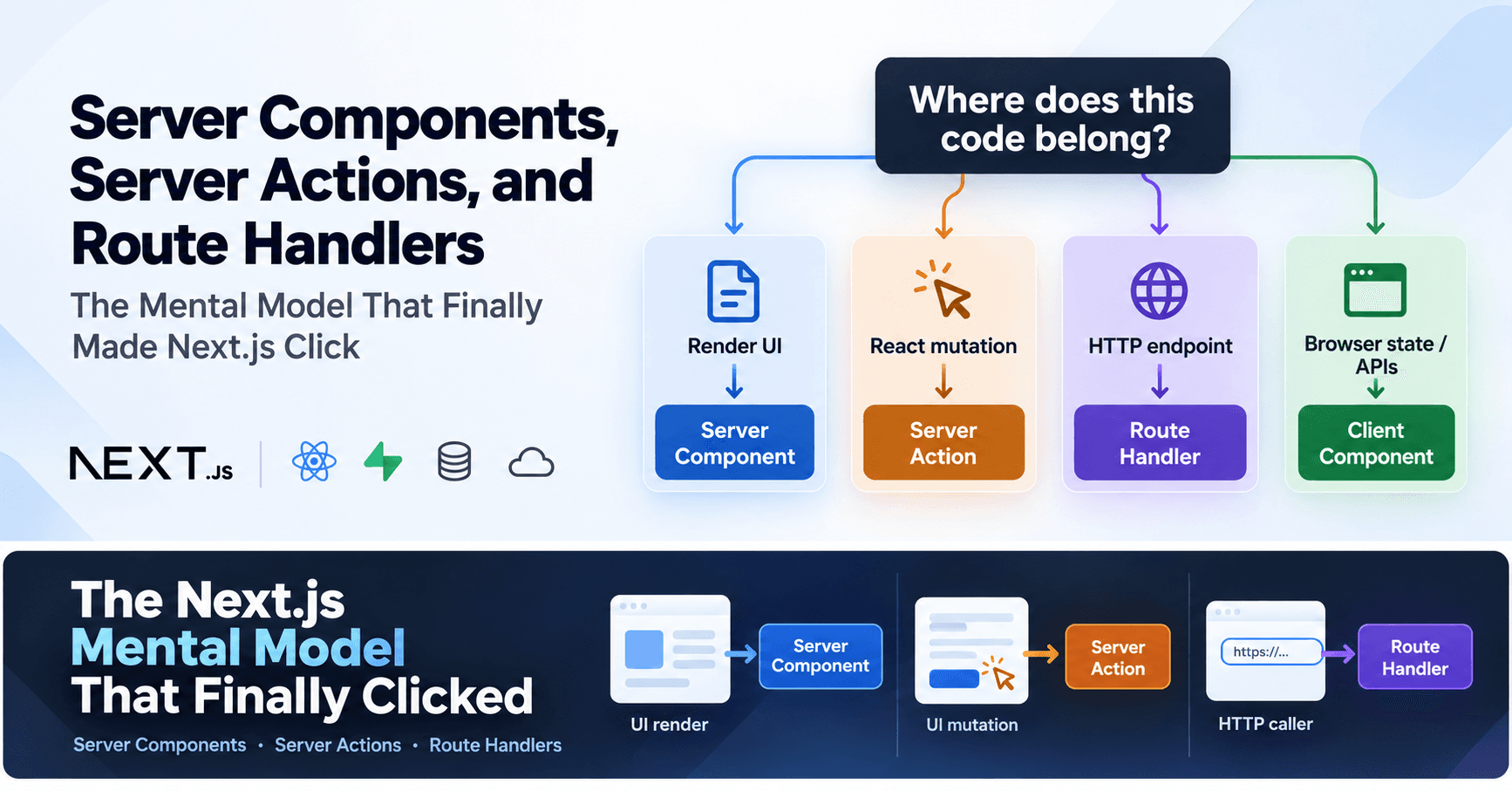
The decision framework I now use
After building DocumentHub, I use these as starting points:
- Render data: start with a Server Component; handle access checks before rendering.
- Mutate from the app UI: consider a Server Action; validate input and check authentication and authorization.
- Provide an HTTP interface: use a Route Handler for callbacks, webhooks, public APIs, or another explicit HTTP contract.
- Use browser state or APIs: add a Client Component only around the UI that needs it.
These are useful starting points, not absolute framework rules. Move reusable or complex logic into a separate module when that gives the application a clearer boundary.
My old architecture wasn't wrong
Server Components and Server Actions do not make explicit APIs obsolete. An API or service boundary can be valuable when multiple clients need the same contract, services deploy independently, or ownership and domain complexity call for it.
What changed for me is that I no longer add an HTTP layer automatically when the only caller is the Next.js UI. I can still extract reusable application logic and invoke it from an action, Route Handler, or another part of the system when there is a reason to.
Less boilerplate doesn't mean less security
Server Actions are reachable through network requests, not just through the UI. Treat them as callable server code and apply the usual protections:
Authentication
Authorization
Input validation
Error handling
In DocumentHub, the action checks the authenticated user's ID in its query, while Supabase Row Level Security provides an additional data-level boundary. Less API boilerplate does not mean less security work.
The bigger lesson for me was to stop choosing architecture by habit
DocumentHub is both a learning project and a portfolio piece. I built it to learn how Next.js and Supabase work together and to show how I can use them to develop an application.
Building it gave me a concrete way to reconsider familiar architectural habits. Its document page uses a Server Component to load data, forms to invoke actions for lifecycle changes, and a small Client Component for delete confirmation. The auth callback and sign-out use Route Handlers. Those choices fit the project; a larger system could call for different boundaries.
The question I ask now
The browser/server boundary does not automatically need to become an API boundary that I design myself. Instead of starting with “What endpoint should I create?”, I ask: Who needs to invoke this code, and where does it need to run?
That question helped the App Router model click for me—and helped me notice an architectural habit I had stopped questioning.
About DocumentHub
DocumentHub is my Next.js and Supabase learning project and portfolio piece. The linked source includes the document page and actions, upload action, and auth sign-out Route Handler.
Live application: document-hub-two.vercel.app